



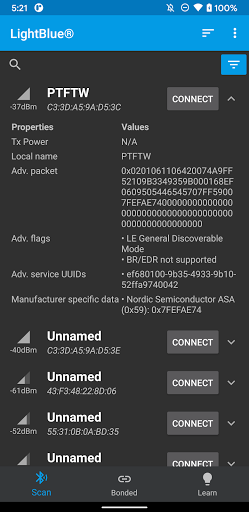

About LightBlue® — Bluetooth LE
LightBlue® connects to devices using Bluetooth Low Energy. Scan, connect, and browse BLE devices, reading and writing data. It's useful for testing and development.
Key Functions
Scan for BLE devices
Discover nearby Bluetooth Low Energy peripherals and view basic information like name and signal strength.
Connect and browse
Establish a connection to a BLE device and explore its services and characteristics.
Read and write data
Read data from characteristics or write data in hex or string format for firmware testing.
Notifications and logging
Receive real-time notifications for data changes and log all BLE events for review.
Use Cases
Developers can test their new BLE peripherals and firmware. Users can also find nearby BLE devices like fitness trackers or sensors by checking their signal strength.
How It Works
- Open the app and grant location permissions if prompted on Android M+.
- Tap the scan button to discover nearby BLE devices.
- Select a device from the list to connect and view its services.
- Interact with characteristics by reading, writing, or subscribing to notifications.
 Google Play
 App Store
